
12Play App Requirements
- Official Website
- New Customers Only. 18+. T&C Apply.
- Download Size (APK File)
102.8 MB
- Installed Size
170 MB on our device after setup
- Free Storage Required
Around 400 MB before you start
- App Version Tested
2.0.1
- Android Requirement
Android 6.0 (Marshmallow) or newer
- Permissions Requested
21 in total
- Welcome Bonuses
Up to RM 34 in free credits, plus one of: 100% up to RM 588 (all games), 150% up to RM 300 (sports & esports), 100% up to RM 300 (slots)
- Auto-Updates
In-app updater prompts you, then you confirm the install
- Google Play Store
Not listed. Direct APK download only
- iOS / iPadOS
No native app. PWA via Safari
- Test Device
Samsung Galaxy S24
12Play App Review: Mobile Casino & Betting App for Android
We downloaded the APK ourselves, installed version 2.0.1 on a Samsung Galaxy S24, pulled the permission list off the device, and worked through registration, a Touch 'n Go deposit, the casino lobby, and the sportsbook before writing any of this.
The short version: if you're on Android and you use 12Play more than occasionally, the app is the better way in. Navigation is tidier than the website, the live casino and slots suit a phone screen better, and there are bonuses inside the app you can't claim through a browser. On iPhone, there is no app at all; you get a web shortcut, and it's worth knowing exactly what that costs you before setting it up.
Four findings from our own device and from 12Play's own terms shaped this review. None of them appear in the guides currently ranking for 12Play app download.
The APK is 102.8 MB and installs to 170 MB. Most pages covering this app quote a size of around 25 MB. That figure is wrong, and it matters whether you're downloading over mobile data or installing on a phone that's nearly full.
The app requests 21 permissions. We pulled the full list from our test device and published it below, along with what each one is actually for. That list also corrected something we had wrong in an earlier version of this review, which we've written up in its own section.
The welcome bonus turnover is calculated on your deposit plus the bonus, not the bonus alone, which roughly doubles the figure most people expect. We've worked all three offers out properly further down.
12Play publishes no gambling license number anywhere. We looked. That's worth understanding before you put a gambling app on your home screen.
Android: download the official APK from 12Play for the full app.
iOS: Use Safari's "Add to Home Screen" to install the 12Play PWA. It's a web shortcut rather than an app, and it lacks the fingerprint login and native video player.
 New players can claim a free MYR 12 welcome credit on their first deposit through the 12Play app.

What We Checked in the 12Play App
| What We Checked | What We Found |
|---|---|
| APK file size | 102.8 MB, measured after download |
| Installed size | 170 MB once set up on our S24 |
| Version tested | 2.0.1 |
| Permissions requested | 21, full list published below |
| In-app updater | Present. The app prompts and downloads; you confirm the install |
| Native iOS app | Doesn't exist, despite what several guides claim |
| Markets served | Malaysia, Singapore, Vietnam, Thailand, and international |
| License number displayed | None published anywhere on the site |
| Business address | St Julian's, Malta — an address, not a Maltese gaming license |
| Bonus turnover basis | Deposit + bonus, at 10x, 12x or 25x depending on the offer |
| Turnover without a bonus | Still 1x deposits must be wagered once before any withdrawal |
APK File Download in Malaysia: Latest Version
Get the 12Play APK file and be playing within minutes
The current 12Play Android app is ready for download. Use the button below to reach the official 12Play site and start the APK download:
Visit Official 12Play & Download APK New Customers Only. 18+. T&C Apply.How to install the 12Play app in Malaysia:
- Use the link above to reach the official 12Play site.
- Open the app download page from the bottom of the main menu.
- Press "Android" to download the .APK file, or scan the QR code on the page to send the download straight to your phone.
- Open the downloaded file and install it. The installation itself finished quickly on our S24.
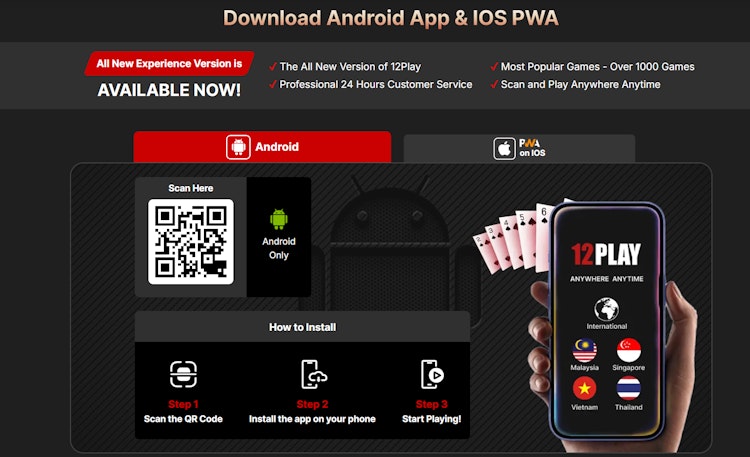 The Android tab on 12Play's download page. Scan the QR code or press the Android button, and note the "Android Only" label and the phone graphic showing Malaysia alongside Singapore, Vietnam, Thailand, and an international build.
Plan for the file size before you start
At 102.8 MB to download and 170 MB installed, this is a heavier app than most 12Play guides suggest. The 25 MB figure doing the rounds appears to have been copied between sites without anyone measuring the file. We'd start the download on Wi-Fi where possible, and make sure the phone has roughly 400 MB free: the APK sits in your Downloads folder right next to the installed app until you delete it, and game assets cache on top of that.
App Specifications & Storage
Worth being precise about, because the figures circulating for this app aren't measured.
| Specification | What We Found |
|---|---|
| APK download size | 102.8 MB |
| Installed size | 170 MB after install and initial caching |
| Free space we'd want first | Around 400 MB |
| Version we tested | 2.0.1 |
| Permissions requested | 21 |
| Test device | Samsung Galaxy S24 |
| Minimum Android version | Android 6.0 (Marshmallow) or newer |
The gap between 102.8 MB and 170 MB is normal, and it catches people out. Android needs temporary space to extract the package during installation, and then the app starts caching game assets, live scores, and lobby graphics. That cache grows the more you use it, and the APK stays in your Downloads folder afterward unless you delete it.
Turning On "Install Unknown Apps" Without Leaving Yourself Exposed
Android blocks sideloaded installs by default, and that default is there for a reason. The safe pattern is narrow and temporary:
- Download the APK first, then tap the file.
- Android offers to open settings for the browser you downloaded through — grant permission to that one app.
- Install.
- Go back and switch the permission off again.
Leaving sideloading enabled across the system is what turns a malicious APK into a real problem later. Granting it to one browser for half a minute doesn't.
Google Play Protect Will Flag the Install
Play Protect warns about anything Google hasn't scanned through the Play Store, and every gambling APK in this market falls into that bucket. The warning describes the distribution path, not 12Play specifically. You'd see the same message installing any of the operator apps we've reviewed.
What it does mean is that nobody is checking the file on your behalf. The domain you downloaded from is carrying all the weight, which is why the section below matters more than anything else here.
The 21 Permissions Requested
We pulled the full permission list off our test device. It's the part of a sideloaded app nobody publishes, and it's what tells you where the software can actually reach on your phone.
Twenty-one is a reasonable number for an app handling identity verification, live video, push notifications, and payment scanning. For comparison, the 1xBet app requests 39. The count on its own means little; what matters is which ones, and whether each has a reason.
Permissions you'll be prompted for
These are what Android calls runtime permissions, meaning the system asks you directly rather than granting them at install. You'll see the prompt either at startup or the first time a feature needs one.
| Permission | What It's For |
|---|---|
| Location (fine and coarse) | Confirms your jurisdiction so the operator can comply with regional gambling rules, including verifying that access comes from a supported market like Malaysia or Singapore |
| Camera | KYC document uploads, live profile photo verification, and scanning payment QR codes such as DuitNow QR or PayNow |
| Storage, photos and media | Saving deposit and withdrawal receipts, downloading app asset updates, and selecting verification images from your gallery |
| Phone state | Reads device identifiers for account security, managing an account across several devices, and fraud prevention |
Location has to stay on. It isn't optional in a licensed gambling app, and declining it will stop bets from being accepted. The other three can be granted when a feature needs them, rather than up front; camera, in particular, only matters when you're uploading KYC documents or scanning a QR code to deposit.
No contacts or microphone permission. Worth noting: both appear in some competing betting apps, and neither is needed for betting.
Network & performance permissions
Granted automatically, and none of them access personal data.
| Permission | What It's For |
|---|---|
| Internet, network state | Connecting to 12Play's servers to pull live casino streams and real-time sports odds, and to place bets |
| Wi-Fi state | Monitoring connection stability so live dealer video quality adjusts to your bandwidth |
| Vibrate | Haptic feedback when navigating menus or placing a bet |
Notifications & system utilities
| Permission | What It's For |
|---|---|
| Post notifications | Push notifications for live match updates, bet settlement, deposit and withdrawal confirmations, and promotions |
| Request install packages | Lets the app download and prompt installation for its own updates, without sending you back to a browser |
| Wake lock | Keeps the screen awake during live streaming and while a live bet is confirming |
How to Revoke Permissions You Don't Want
On Android 6.0 and above, you can turn most of these off at any time without breaking the app:
- Open Settings → Apps → 12Play
- Tap Permissions
- Toggle off anything you'd rather not share
Location and internet have to stay on. Location is a regulatory requirement rather than a convenience feature, and the app can't process bets legally without it. Everything else is negotiable, and the app will prompt you again if you later use a feature that requires it.
Correction: The App Does Update Itself
An earlier version of this page said the 12Play app had no updater and that every update meant a manual reinstall from the download page. That was wrong, and pulling the permission list is what showed us.
REQUEST_INSTALL_PACKAGES is in the list. An app can only declare that permission if it's built to download and install its own updates, which is what 12Play does.
How it works: When a new version ships, the app can download the update internally and prompt you to install it. Android still requires you to confirm the installation, a standard security step for any APK and not something 12Play can bypass. So it isn't fully silent, but it isn't a manual reinstall either.
What we got wrong and why. We looked through the app's settings menu, found no visible update control, and concluded there was no updater. The permission declaration says otherwise, and the permission is the more reliable signal. We should have pulled the list before making the claim.
What this doesn't change: you still need to obtain the original APK from the correct source. The updater only helps once you've installed a genuine copy, so the section below is the important one.
Making Sure You Have the Real 12Play App
Search for the 12Play app, and you'll find a crowded field of lookalike domains — sites using the 12Play name that aren't the operator. Several host their own APK links. At least one instructs readers to download 12Play from the Apple App Store, which is straightforwardly impossible: there is no 12Play listing on the App Store, and 12Play's own download page says "Android Only" in plain text.
An APK from the wrong domain is the realistic way someone loses an account here. It doesn't take a sophisticated attack; a simple login screen that looks right and forwards your credentials is enough.
- Use one link, every time. Bookmark it or come back to this page.
- Check the address bar before downloading, not after.
- Never install a 12Play APK sent to you over WhatsApp, Telegram, or SMS, regardless of who it appears to come from.
- Only accept update prompts from inside the app itself, never from a browser page telling you an update is available.
Security note
Always download the 12Play APK from the official 12Play website in Malaysia. Third-party mirror sites are real phishing threats in this market, and a sideloaded APK from the wrong source has full access to whatever you type into it.
12Play App vs Website vs PWA
We ran all three on the same account, on the same connection, across the same testing period.
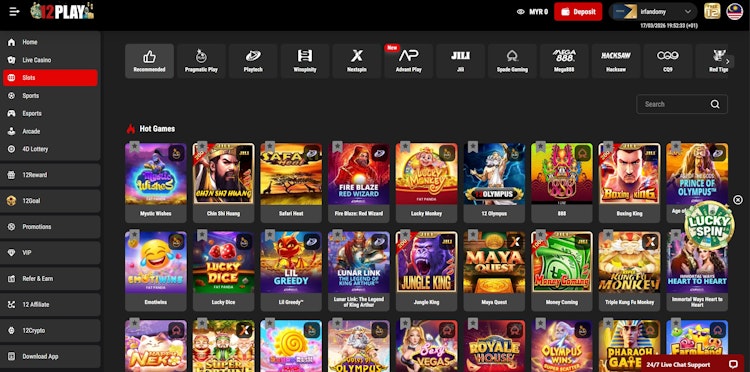 The slots section on the 12Play website in a desktop browser. More on screen, but denser to work through than the app's layout, which is the main reason we'd point regular Android players toward the app.
| Feature | 12Play App (Android) | 12Play PWA (iOS) | 12Play Website |
|---|---|---|---|
| Login | Fingerprint or saved credentials | Manual, and iOS logs you out periodically | Manual |
| Storage | 102.8 MB download, 170 MB installed | Negligible | None |
| Data per session | Lowest — assets stored locally | Higher than the app | Highest |
| Live streaming | Native player, least buffering | Browser player | Browser player |
| Devices | Android only | iOS, HarmonyOS, Windows, Android | Any device |
| App-only promotions | Yes | No | No |
| Updates | In-app prompt; you confirm the install | Automatic; it's the live site | Automatic |
| Security | App-level encryption, installed outside the Play Store | Browser SSL | Browser SSL |
For regular Android play, the app is the better tool: easier to navigate, lighter on data, and more comfortable for slots and live tables. If you're on iPhone or you play now and then, the PWA or the site is a fair place to stay.
Installing the 12Play App: Step-by-Step
The 12Play application can be downloaded in two ways: via a direct APK download or by scanning the QR code on the official site. Here's the process we followed on our own device.
PWA on iPhone, iPad & Other Devices
Other operating systems, including iOS, HarmonyOS, and Windows, can add 12Play as a PWA without requiring storage for installation. Apple supports this natively through Safari's 'Add to Home Screen' feature, which places a 12Play icon on your home screen that opens the site in full screen with the browser chrome hidden.
How to install the 12Play PWA:
- Open the official 12Play site in Safari, since iPhone requires Safari specifically, as Chrome on iOS won't offer this.
- Tap the Share icon.
- Select "Add to Home Screen".
- Tap "Add" to confirm.
- Launch it from your home screen.
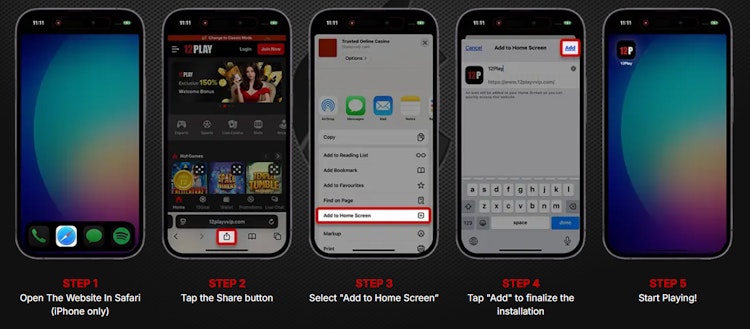 12Play's own iOS walkthrough. Open in Safari, tap Share, select Add to Home Screen, tap Add, then start playing.
Be clear on what a PWA actually is, though. It's a full-screen bookmark, not the app, and the gap isn't cosmetic:
- No fingerprint login. Biometric sign-in is an app feature. The PWA sends you back to typing a password.
- No native video player. Streams run through the browser's player, which buffers more than the app's did on the same connection.
- iOS clears web storage aggressively. Leave it a while and expect to be logged out.
- Higher data use per session, because assets the app keeps locally get fetched again.
The PWA works, and for iPhone owners it's the only option. But we'd rather set expectations than repeat the claim we made in an earlier version of this review, in which we noted that the PWA delivers identical functionality. It doesn't.
Who Licenses the App
An app is only as trustworthy as the operator behind it, so this earns a few paragraphs even on a page about downloading.
12Play's footer states the brand is a registered business entity at 12 Church Street, St Julian's, Malta, and that it is regulated and licensed by the Government of Montenegro, operating under the jurisdiction of E-Gambling Montenegro.
Two clarifications, because that wording invites a misreading.
The Malta address is a business address, not a Maltese gaming license. 12Play is not MGA-licensed. Having an office in Malta and being regulated by the Malta Gaming Authority are different things, and the phrasing sits close enough to imply the latter.
E-Gambling Montenegro is not the regulator. Montenegro's gambling regulator is the Games of Chance Administration (Uprava za igre na sreću). E-Gambling Montenegro is the commercial body that operators sign a cooperation agreement with, after which the Administration issues the license. So "under the jurisdiction of E-Gambling Montenegro" describes a commercial arrangement rather than a regulatory one.
This means the license doesn't exist. It means we couldn't verify it, and we'd rather say so than imply otherwise. Our full 12Play review covers the operator's licensing, terms, and banking in more depth.
Using the 12Play App: Features Worth Knowing
The app offers the full platform, including live casino, slots, sportsbook, esports, arcade, and 4D, in a layout that's easier to navigate than the desktop site.
12Play App Features We Rated
12Goal. A free prediction competition, added to the app after a long run on the website. Predict football results and win cash prizes for correct sets, with payouts at 4/4 and 3/4. It costs nothing to enter, which makes it worth using whether or not you bet.
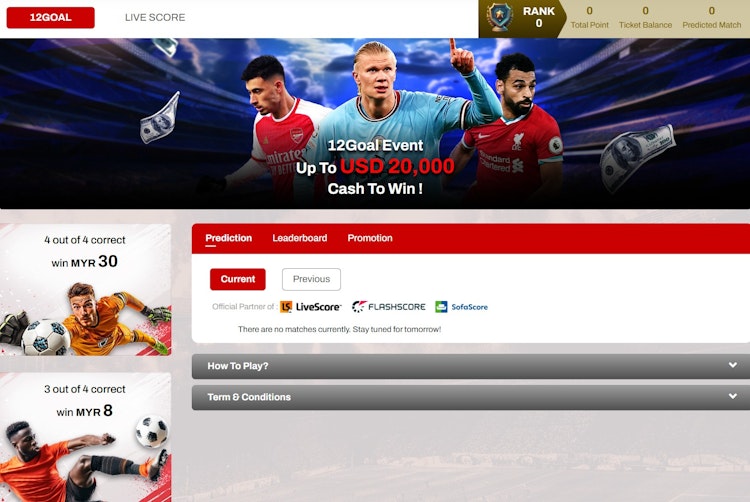 The free 12Goal competition inside the app — predict football results for real money prizes, with payouts at 4/4 and 3/4 correct.
4D lottery. Magnum 4D, Singapore 4D, Toto 4D, Da Ma Cai, Sabah 4D, Sandakan 4D and Cash Sweep results, all in one section. Across the Malaysian operators we've tested, this is one of the fuller 4D sections we've used on a phone.
One quirk worth knowing: 12Play's terms state that all credits in the 4D wallet are locked between 7 pm and 9 pm (GMT+8) daily. If you play 4D through the app, that's a two-hour window each evening where your 4D balance isn't available to move. It's in the rules rather than flagged in the interface, so it catches people out.
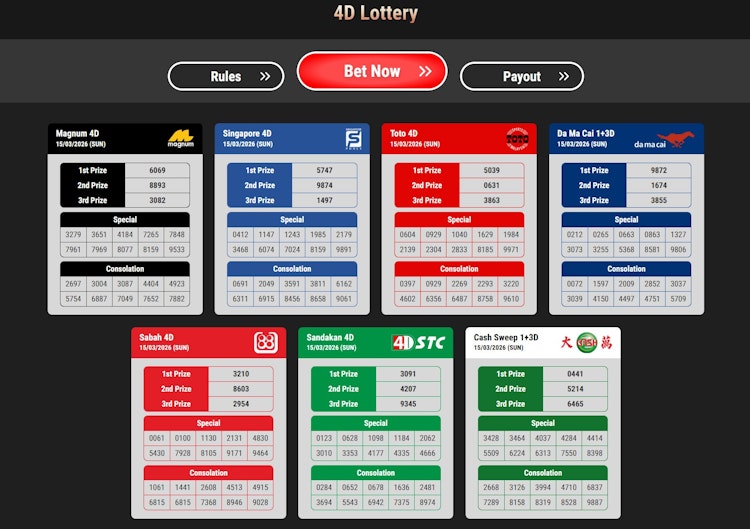 The 4D Lottery section covers Magnum, Singapore, Toto, Da Ma Cai, Sabah, Sandakan and Cash Sweep results.
12Rewards (Lucky Spin). Up to three daily spins for existing customers, unlocking bonuses, credits and prizes, with the number of spins tied to deposit and play activity.
Local payment support. Deposits run through Touch 'n Go, DuitNow, TruePay, EeziePay, FPX and online banking, alongside Tether (USDT), Bitcoin and Ethereum. Our own deposit went through Touch 'n Go and was credited immediately, which is what local rails should do. We have a dedicated banking methods guide that explains how each works, including which support deposits and withdrawals.
Fingerprint login. Android only. Beyond saving a few seconds, it breaks the habit of typing credentials into whatever page you happen to have open, which, on a platform with this many lookalike domains, is a security benefit rather than a convenience.
Native video player for live streams. The app uses its own player instead of the browser's, and across our sessions, that meant less buffering on football and esports streams than when the same fixture was watched on the site over the same connection.
What to Do First in the App
- Settings. Work through them once. Layout, navigation, and notifications are all adjustable, and the defaults aren't ideal.
- Deposit limits. Set them before funding the account rather than after.
- Promotions tab. Three welcome bonuses are listed here, and choosing the right one matters more than the welcome offer percentages suggest; see the breakdown below.
- KYC. Upload ID from the Account area early. Verification is required before withdrawals in any case, and doing it in advance removes the wait at the worst possible moment.
Claim Free Credits in the App

12Play
New customers in Malaysia can claim up to RM 34 in free credits through the 12Play app. Registering and depositing unlocks RM 12 on the first deposit, which can be activated alongside one of the welcome bonuses.
A further RM 22 is redeemable after your first successful withdrawal, worth noting because the structure rewards you for actually cashing out rather than only for depositing.
12Play App Welcome Bonuses: Complete Breakdown
Free credits on your first deposit, plus a choice between three welcome bonuses
There are three welcome offers in the app, selected from a dropdown on the deposit page. We had this wrong in an earlier version of this review, and so does most of the coverage we've read, but the RM 588 offer belongs to the all-games bonus, not the sports one.
Here's what 12Play's own promotion page actually says:
| Bonus | Match | Max Bonus | Turnover |
|---|---|---|---|
| All games (100% Welcome Bonus) | 100% | RM 588 | 25x |
| Sports & Esports | 150% | RM 300 | 10x |
| Slots | 100% | RM 300 | 12x |
The minimum deposit is RM 30 for all three. One bonus per account, new members only.
The Detail That Changes Everything: Turnover Is on Deposit Plus Bonus
This is the part worth slowing down for, because it doubles the number most people have in their head.
12Play's own worked example spells it out: a RM 1,000 deposit with a RM 1,000 bonus at 25x produces RM 50,000 in required turnover. That's 25 × (1,000 + 1,000), not 25 × 1,000.
Run the same math across all three offers at their maximum:
| Bonus | Max Qualifying Deposit | Bonus Received | Turnover Required |
|---|---|---|---|
| All games (25x) | RM 588 | RM 588 | RM 29,400 |
| Sports & Esports (10x) | RM 200 | RM 300 | RM 5,000 |
| Slots (12x) | RM 300 | RM 300 | RM 7,200 |
Our read: the sports and esports bonus is comfortably the most achievable of the three. RM 5,000 in qualifying turnover over a normal betting month is realistic for someone who bets regularly. RM 29,400 is a different proposition entirely, and the 100% all-games bonus is only worth taking if you're a high-volume player who understands what they're signing up for.
One inconsistency we noticed. 12Play's worked example uses an RM 1,000 deposit paying an RM 1,000 bonus, but the same page caps the all-games bonus at RM 588. Those two statements can't both hold. Our reading is that the example is illustrative math rather than a real payout, and that RM 588 is the actual ceiling. If you're planning a large first deposit, confirm with support before you send it, not after.
Games and Bets That Don't Count Toward Turnover
12Play's exclusion list is longer than most, and a few entries will genuinely catch people out:
- 3 Pictures
- Blackjack is excluded entirely, which is unusual
- First-person games
- Casino Hold'em and poker games
- Number games
- Board games
- RNG games, including arcade games and non-live table games
- Mega888
- Draw Result games
- Opposite betting, which is backing both sides of the same market
- Voided or canceled bets
- Odds below 1.50 in decimal format
- Roulette bets covering more than 24 numbers
The blackjack exclusion is the one we'd flag hardest. It's a staple of most casino bonus offers elsewhere, and anyone assuming it counts here will clear nothing at all.
12Play also identifies two-tier betting and progression betting as patterns that can lead to the forfeiture of bonuses, winnings, and deposited funds. Whatever you think of how broadly that could be applied, it's stated plainly rather than buried, which is more than we can say for several competitors.
Two Rules Outside the Bonus Terms
Deposits always have a 1x turnover, even without a bonus attached. 12Play's rules state that any deposit made without claiming a promotion must be wagered once before a withdrawal can be requested. That's a standard anti-money-laundering measure rather than a bonus condition, so "deposit and cash straight out" isn't available.
One promotion per person, household, address, phone number, payment account, shared computer, and shared IP. Worth reading twice if you share a household or a network with another player. 12Play explicitly names shared computers in schools, libraries, and workplaces.
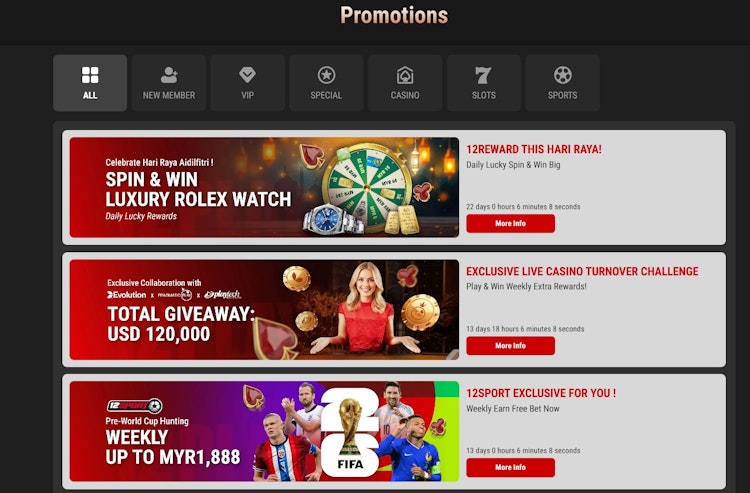 The promotions section inside the app, where app-exclusive offers sit alongside the standard welcome bonuses.
NB! To claim 12Play bonuses in the app, deposit at least RM 30 and select the promotion from the dropdown under "Promo Selection" during the deposit process. The bonus credits to your wallet automatically once selected, but it isn't applied retroactively, so choosing it after depositing isn't an option.
Banking in the 12Play App: What We've Tested So Far
We deposited through Touch 'n Go, and the funds credited immediately.
On withdrawals, we're going to be straight with you rather than fill in the gap. We haven't completed a withdrawal on this account yet. An earlier version of this page quoted average payout times of 15 to 30 minutes; we can't stand behind that figure, so it's gone.
What we're doing instead: running the full cycle end-to-end, from deposit through bonus activation and wagering to cashout, then publishing the actual timings, method, and amount here. That update is due at the end of September 2026. If you're weighing up the app specifically for payout speed, it's worth coming back for. The process was delayed by 2 weeks, and the banking information will be uploaded in the next update.
Two things we can say now. KYC is the variable you control, as 12Play reserves the right to request ID, card copies, passport, driving license, or a recent bank statement before releasing any withdrawal, and unverified accounts wait at every operator we've tested. And the name-matching rule is enforced: your bank account holder name must match your registered 12Play name for deposits and withdrawals to go through.
How the 12Play App Compares to Other Mobile Apps
For an app review, the comparison that matters isn't bonus size; it's what the software does, what features it offers, and which devices it reaches.
| App | iOS in Malaysia | Android | Live Streaming | Esports |
|---|---|---|---|---|
| 12Play App | PWA only | APK, 102.8 MB | Yes, native player | Yes |
| 1xBet App | PWA only, not in the Malaysian App Store | APK, 48.2 MB | Yes | Yes |
| BK8 App | Native app | APK | Yes | Yes |
| MelBet App | Native app | APK | Yes | Yes |
| Uwin33 App | No app | APK | Yes | Yes |
Where 12Play's app holds up: the app-only free credits and 12Goal give casual players something to do without staking much; the 4D section is fuller than most; and the sports bonus at 10x is friendlier than the market norm, even accounting for the deposit-plus-bonus basis.
Where it falls behind: no iOS app, no published license number, a 102.8 MB download heavier than most competitors, and a 25x all-games bonus that's harder to claim than the flashy RM 588 offer suggests.
We'd still like to see a dedicated iOS app from 12Play, since iPhone share keeps climbing in Malaysia and the PWA isn't an equivalent substitute. Broader comparisons live on our best betting apps in Malaysia page.
What We Haven't Tested Yet
Worth stating plainly, because reviews claiming to have tested everything usually haven't. Our testing process is the same on every operator app we review.
- Testing ran on a Samsung Galaxy S24 with app version 2.0.1. We can't speak to older Android hardware or earlier builds, but a live chat agent confirmed that Android 6.0 (Marshmallow) or newer is the minimum Android version the APK requires.
- We have not completed an app withdrawal. Full deposit-to-cashout timings are coming at the end of September 2026 (delayed by 2 weeks).
- We could not verify 12Play's license number, because none is published.
- We haven't been through an update cycle in the app. The updater exists and declares the permissions it needs, but we haven't yet had a version ship during testing.
Advantages & Disadvantages
We've gone through the wider platform in our complete 12Play review. This is specifically about the app.
Pros & Cons
- Lower data usage and cleaner navigation than the website
- Live casino and slots are more comfortable to play through the app
- App-exclusive bonuses including RM 12 and RM 22 in free credits
- Sports and esports bonus at 10x is achievable, with only RM 5,000 turnover at the maximum
- In-app updater, so you're prompted when a new version ships rather than having to check
- 21 permissions requested, with no contacts or microphone access
- Fingerprint login cuts the habit of typing credentials into unfamiliar pages
- Native video player handles live streams better than the browser
- Broad local payments, including Touch 'n Go, DuitNow, TruePay, EeziePay, FPX and crypto
- Bonus terms are published in full, including the worked turnover example
- No native iOS app, and the PWA loses biometric login and the native player
- 102.8 MB to download and 170 MB installed, which is heavier than most rivals
- Turnover is calculated on deposit plus bonus, roughly doubling what most players expect
- Blackjack contributes nothing toward turnover, unlike at many competitors
- No license number published anywhere, so the license can't be checked against a register
- 4D wallet credits are locked between 7 pm and 9 pm daily
- A gambling app on your home screen removes every barrier between impulse and deposit, so set limits before you fund it
Summary & Verdict
The 12Play app is worth installing if you're on Android and you play more than occasionally. Navigation beats the website; the 4D section is the fullest we've used on a phone; and the app-only free credits are real money with no extra stake. It asks for 21 permissions with no contacts or microphone access, which is leaner than most of its rivals, and it updates itself once installed.
The catches are the 102.8 MB download, no iOS app beyond a web shortcut, and a bonus structure where turnover runs on your deposit plus the bonus. Take the 10x sports offer, skip the 25x all-games one, and set a deposit limit before you fund anything.
18+ | Gambling involves real financial risk. Play responsibly.
An app on your home screen removes every barrier between an impulse and a deposit.
Never gamble with money you can't afford to lose, and never gamble to solve a financial problem. Set a deposit limit before you fund an account.
Free help in Malaysia: Befrienders KL on 03-7627 2929 (24 hours) and AKPK on 03-2616 7766 for financial counseling. More on our Responsible Gambling page.
Removing the 12Play App
Uninstalling the normal way requires you to long-press the icon, then select Uninstall, which clears the app and its local data from the device. Delete the 102.8 MB APK from your Downloads folder as well, since it remains there after installation.
Two things uninstalling doesn't do. It doesn't close your 12Play account, and you must still contact support for that. And it doesn't self-exclude you, since the site remains a search away. If you're removing the app to stop rather than to free up storage, request account closure or self-exclusion through support as well, and use the resources above.
On iPhone, removing the PWA works like deleting any home screen icon.
FAQ About the 12Play App
